 WhatsApp Automation
Your workflow.
Your WhatsApp message.
Send the next update when your Bitrix24 process reaches the right step. Connect a company phone, add the WhatsApp automation rule, and follow each execution from one place.
Bitrix24 workflows and automation rules · Text messages · QR connection
Let your process
handle the follow-up.
Appointment reminders, order updates and handover messages can become part of the process your team already uses. You decide the trigger, recipient and content in Bitrix24.
- One familiar action
- WhatsApp: send message appears in automation rules and the workflow designer. Configure the sender number, recipient number and text.
- Your workflow values
- Insert supported fields and variables instead of maintaining a separate contact list. Use telephone numbers with their international country code.
- A visible execution result
- View sent, failed or uncertain runs in the application. A successful send returns the WhatsApp message ID; it does not confirm delivery or reading.
Built into your Bitrix24 process.
The application adds its own automation rule. Configuration and execution remain connected to your Bitrix24 account.
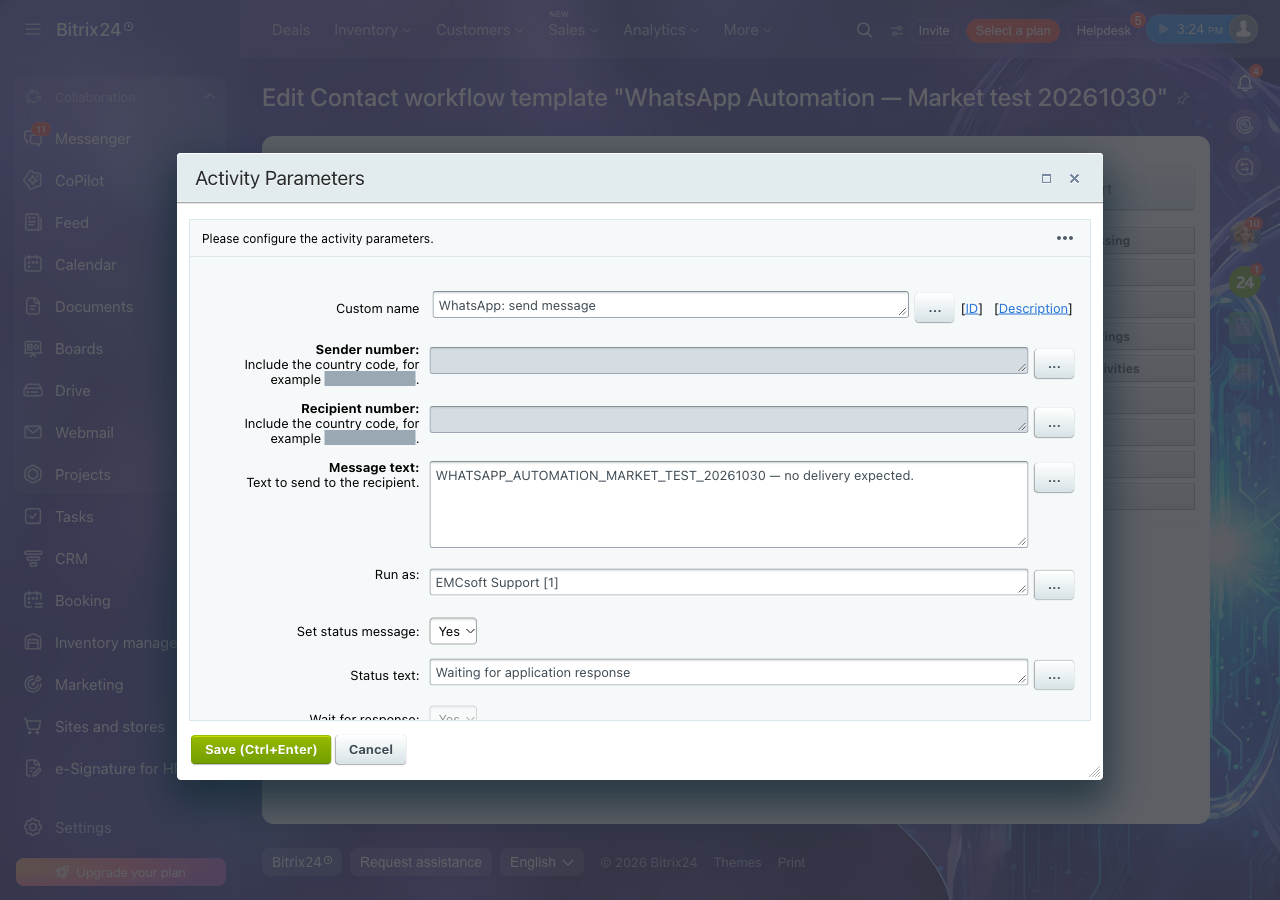
Connect once. Add your action.
- Install as administrator
Provide your installation contacts and accept the EULA. WhatsApp Automation registers one send-message rule for the account.
- Link a company phone
Add an account and scan the QR code using WhatsApp’s Linked devices screen. Wait until the connection is ready.
- Configure your process
Add WhatsApp: send message, enter both numbers and the text, and enable waiting. Test a manual run before enabling automatic triggers.
Know when a step
needs attention.
Disconnected phones should not silently disappear into a process. WhatsApp Automation records errors and queues notifications for the installing administrator.
- Connection alerts
- An independent monitor checks the WhatsApp worker heartbeat and connected accounts. Error notifications are deduplicated and retried when Bitrix24 is unavailable.
- Failed workflows
- When sending cannot proceed, the application requests workflow termination with an error. Keep waiting enabled so dependent steps do not run before the response.
- Uncertain sends
- If the send result is unknown, the application does not automatically repeat the message. Check WhatsApp before starting a new run.
Company phones.
One admin workspace.
Administrators manage linked phones and review recent executions. The verified installing administrator owns the background Bitrix24 authorization.
Removing an account revokes its connection and session keys. Run history remains available for review.
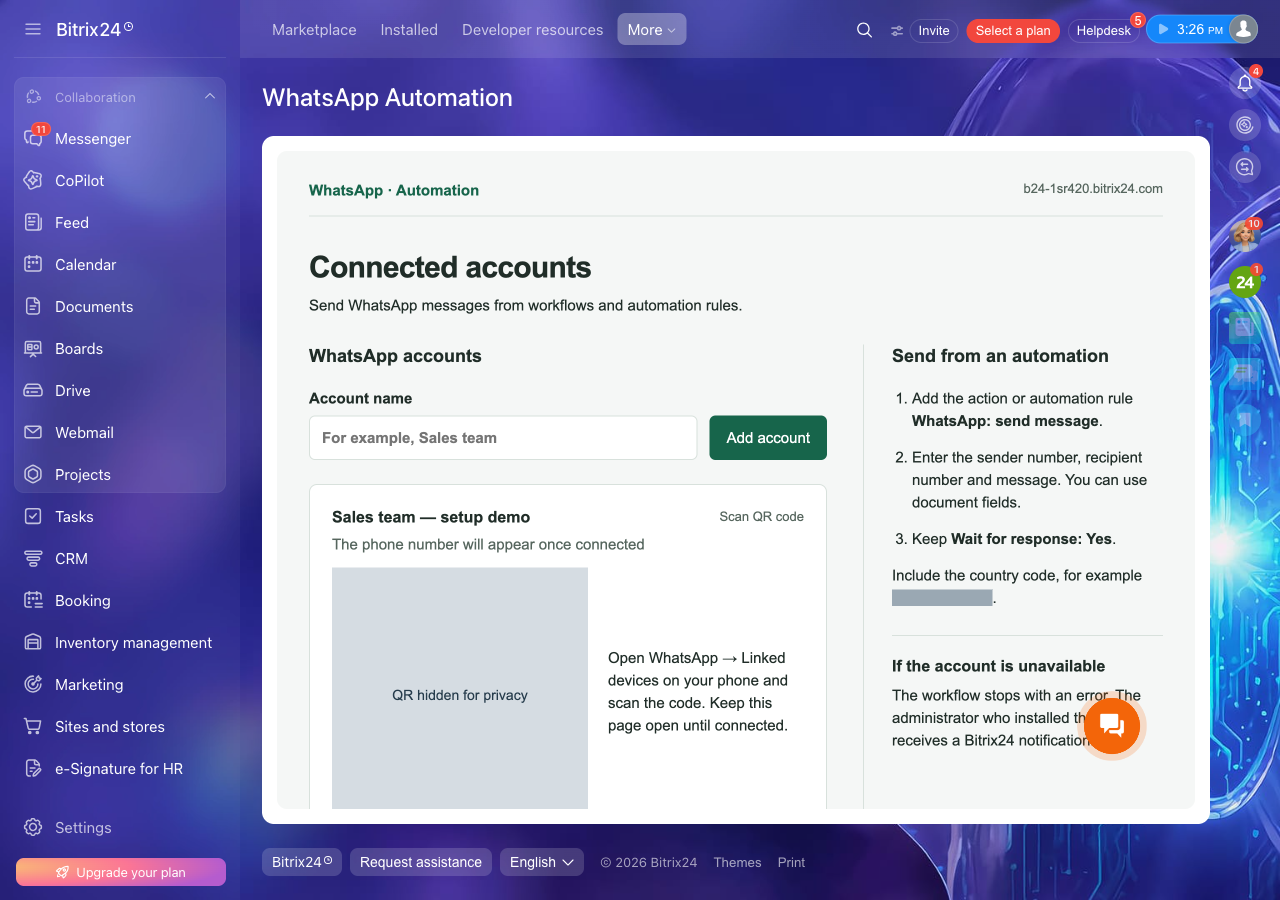
Before you automate
Is this the official WhatsApp Business Platform?
No. This independent EMCsoft application uses Baileys and the WhatsApp Web protocol as a linked device. It is not endorsed by WhatsApp or Meta. Protocol changes and account restrictions may affect availability.
Which Bitrix24 plan do I need?
Use a plan that supports REST applications, workflows and the automation rules you intend to use. The Market listing requires Professional or higher. Your Bitrix24 subscription is separate from this application.
Does a successful run mean the message was delivered?
No. It means WhatsApp accepted the send and returned a message ID. Recipient delivery and reading are not confirmed by the application.
Can I send attachments or read incoming conversations?
This application sends text messages up to 10,000 characters from your configured workflow. It does not provide an inbox, attachment sending, voice calls or delivery/read receipts.
What if the administrator loses access?
The installing administrator must open the application to restore its background authorization. Another employee’s credentials are not substituted automatically.
How much does the application cost?
The current release has no in-app charge. Bitrix24 subscription and WhatsApp account requirements still apply. Market publication is being prepared; contact EMCsoft for current availability.
Make the next message
part of the process.
Connect a phone. Configure the action. Keep the result in view.
Open the setup guide